
Gmail Vs Outlook: Which One is Best For Business?
November 3, 2026https://youtu.be/lR8h7rR1m5I
Gmail and Outlook are the two heavyweights of the email world, so it’s only natural for organisations to question which platform is best.
With Gmail used by around 1.8 billion people worldwide, Google’s email platform has become one of the most widely adopted email services available. On the other hand, Outlook continues to be one of the most established alternatives, building on decades of familiarity following Microsoft’s Hotmail era, with email addresses going as far back as 1997.
However, popularity alone doesn’t determine which email platform is right for a business. Both Gmail and Outlook offer reliable email services, but they take a different approach to managing your inbox. The right platform can influence how easily employees find conversations, organise information, collaborate with colleagues and protect sensitive business data.
The Three Perspectives
To properly compare Gmail and Outlook, it’s useful to look at the decision from the three perspectives involved when it comes to webmail services, these being:
- The business perspective
- The end user perspective
- The IT administrator perspective
Each group will have different priorities, so let’s take a closer look.

Gmail comes with many more benefits for businesses when compared to Outlook. Image credit: Damson Cloud
Gmail vs Outlook: The Business Perspective
For businesses, factors like security, reliability, ease of use, and productivity all play an important role when choosing a webmail service.
One of the biggest differences between Gmail and Outlook is how users access their email. Gmail provides a web-based experience, creating a more consistent experience across an organisation. Whether employees use a desktop computer, laptop, or mobile device, the interface remains familiar. This makes it more efficient to train staff on Gmail, since everyone has the same experience no matter what device they use. One universal platform closes knowledge gaps faster and boosts team confidence.
However, Outlook remains a popular choice for businesses that prefer a more traditional email setup. Many users are already familiar with its folder-based organisation, desktop application and structured approach to managing large inboxes. Neither approach is automatically better. The key consideration is which workflow makes the most sense for your team.
Security is another important factor. Both Gmail and Outlook provide features designed to protect users from spam, phishing attempts and unauthorised access. From two-step verification to suspicious login alerts and advanced filtering, these help protect sensitive information, adding another layer of security for businesses, users and administrators collectively.
Of course, security depends on more than the email platform itself. Good account management, the correct settings, and regular user training all play an important role in keeping business email secure. Following Google’s Best Practices for Gmail accounts is the best way to improve overall performance for the whole business.
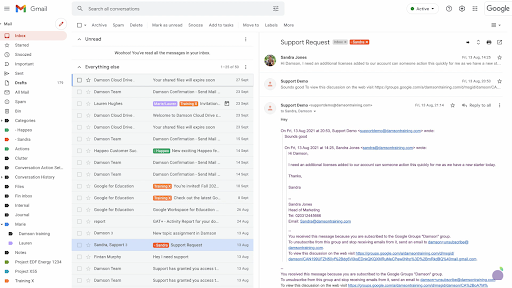
Here’s an example of a Gmail environment that’s been customised to look more like Outlook:
Gmail vs Outlook: The End User Perspective
For employees, the best email platform is usually the one that helps them work faster and spend less time managing their inbox.
One of Gmail’s biggest strengths is its search functionality. Rather than relying solely on folders, Gmail lets users quickly find emails, attachments, and conversations. The power of Google Search is something that everyone understands and uses. With Gmail, this is built into the interface, making searching for certain email content much quicker and more accurate. This can be particularly useful for employees who receive a large number of emails every day and need to find information from previous conversations quickly.
Outlook also offers powerful search tools, but many users are used to traditional folder structures and approach email management differently. Outlook focuses more on organising messages using folders, categories, rules, and flags, while Gmail encourages users to search and filter information rather than manually file every message.
Another popular Gmail feature is Conversation View. This shows you how a “conversation” (a backlogged trail of emails) has evolved over time. You don’t have to open several emails to follow the conversation or go searching for a message you may have already read and responded to. For teams that regularly have long email discussions, this makes it much easier to keep track of information without opening individual messages.
Gmail also includes features designed to improve everyday productivity, such as Smart Compose. This predicts the ends of the sentences you write, which you can choose to autofill in order to save time, allowing you to be more productive and focus on more pressing tasks. This can be particularly useful for repetitive replies, quick responses and reducing the amount of time spent writing routine emails.
Another feature worth considering is Confidential mode, a secure send-and-receive feature that lets you protect sensitive information from unauthorised or accidental sharing. Confidential mode messages don't allow you to forward, copy, print, or download messages or attachments, ensuring complete privacy. While other platforms offer their own security controls, features like this can provide additional options when handling sensitive information.

Gmail vs Outlook Features Comparison
When comparing both interfaces, there are a handful of key differences between Gmail and Outlook, including:
Different Ways to Organise Email
One of the biggest differences between Gmail and Outlook is how they organise emails.
Outlook uses a familiar folder system. Users create folders, move emails into them and use categories or rules to organise their inbox. Gmail takes a different approach by using labels. Labels are an effective way of categorising items. Instead of organising emails after you receive them, a label triggers a workflow automatically. As an email hits your inbox, it’s instantly tagged and allocated to its selected label - and you can simply archive that particular label once you’re done with it.
Rather than moving an email to a specific location, Gmail also lets users apply multiple labels to the same message. This means one email could be categorised by client, project or priority at the same time. For users moving from Outlook, this approach can take some adjustment. However, once understood, filters and labels can create a highly efficient way of automatically organising incoming messages.
Managing Attachments and Files
Another practical difference between Gmail and Outlook is how each platform handles file sharing. Traditionally, email users rely on attachments to send documents. However, this can become difficult when files are large, or you're sharing multiple versions of the same document.
Outlook forces you to attach documents, whereas Google suggests attaching Drive links, so you can send much larger files more easily. With an email account, you’re generally limited to around 25MB per attachment, so this integration with Google Drive makes the process seamless for end users.
Gmail’s integration with Google Drive also encourages users to share access to files rather than sending multiple copies as attachments. This helps teams work from the same version of a document and reduces confusion. Outlook users can also share files through connected storage solutions, so both platforms provide ways to move beyond traditional attachments. The main difference is the workflow each platform encourages.
Customising the Email Experience
A common concern for businesses considering Gmail is whether employees who are familiar with Outlook will struggle with the change. The good news is you can customise Gmail to look more like Outlook, which is especially helpful for long-term Outlook users who want a smooth transition. Enabling a preview pane and disabling a couple of other features can make a world of difference in making the Gmail interface look and feel more familiar. This can help businesses introduce Gmail without completely changing how employees interact with their inbox.
In Gmail, there’s also a useful sidebar that gives you instant access to Chat and Meet, as well as easy access to other Google Apps, Studio and Gemini. The apps include Drive, Docs, Sheets, Slides and Tasks - all in a bid to make them better together so that users can stay on top of things more easily, from anywhere.

Gmail vs Outlook: The IT Administrator Perspective
For IT teams, managing email platforms involves everything from security to troubleshooting. The truth is, admins don’t want to support email users because it only adds to their list of software they need to keep on top of. They also have to stay updated and constantly monitor the software to ensure data is safe.
A browser-based email experience can reduce some of the challenges of installing, updating, and maintaining desktop applications across multiple devices. By using Gmail, IT maintenance is reduced, and so is the number of calls to IT support desks. More importantly, this efficient platform changes how people perceive the IT team. Instead of being known as the ‘break/fix’ team, they become the team that boosts efficiency by sharing their knowledge and advising end users on hacks and best practices.
When you migrate to Google Workspace, IT teams can focus on improving processes and helping businesses get more value from their technology.
Gmail vs Outlook: Which Email Platform Should Your Business Choose?
There’s no single answer to whether Gmail or Outlook is the best email platform. Both provide reliable email services, strong security features and tools that help businesses communicate effectively. The most important thing is choosing the platform that supports the way your team actually works.
At Damson Cloud, we help businesses understand the options available and make informed decisions about their email environment. Whether you’re considering moving from Outlook to Gmail, improving your existing setup or simply want advice on the best approach for your business, our team can help you find the right solution.
If you want more information on transitioning to Google Workspace, or have a query relating to Gmail - please feel free to contact the Damson Cloud team today.
As a longstanding member of the Google Cloud Partner Program, Damson Cloud specialises in bringing people and ideas together through new ways of working. We champion the very best practices in remote working and change management, helping companies and their teams collaborate productively from anywhere in the world. To find out more about our services, check out our library of tutorial videos or our blog.